Chapter 02 Computer Basics English + Hindi

Keyboard and Mouse

कीबोर्ड और माउस

Keyboard and Mouse

कीबोर्ड और माउस

Keyboard is used for typing text and commands. Mouse is used to point, click, select, open, and drag items on screen. This chapter connects the topic with classroom explanation, real examples, and hands-on practice.

Keyboard typing और commands देने के लिए use होता है. Mouse screen पर point, click, select, open और drag करने के लिए use होता है. इस chapter में topic को classroom explanation, real examples और hands-on practice से समझाया गया है.
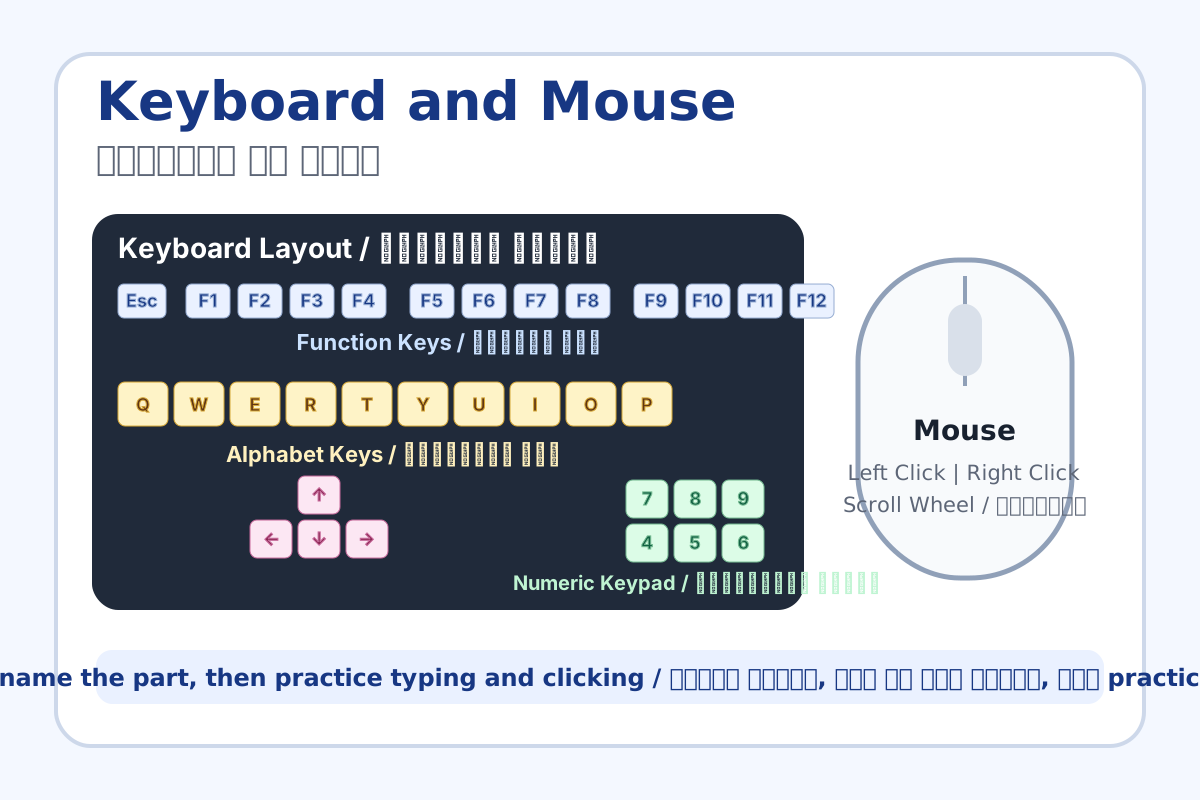
Keyboard and Mouse topic visual / कीबोर्ड और माउस चित्र
Chapter image shows the exact topic parts for visual learning. / Chapter image में topic के parts साफ दिखाए गए हैं.

Tool Heading & Description / टूल शीर्षक और विवरण

Alphabet keys

Alphabet keys is a keyboard or mouse control used for typing, selection, movement, or commands.

Alphabet keys keyboard या mouse control है जो typing, selection, movement या command के लिए use होता है.

Enter key

Enter key is a keyboard or mouse control used for typing, selection, movement, or commands.

Enter key keyboard या mouse control है जो typing, selection, movement या command के लिए use होता है.

Spacebar

Spacebar is a keyboard or mouse control used for typing, selection, movement, or commands.

Spacebar keyboard या mouse control है जो typing, selection, movement या command के लिए use होता है.

Backspace and Delete

Backspace and Delete is a keyboard or mouse control used for typing, selection, movement, or commands.

Backspace and Delete keyboard या mouse control है जो typing, selection, movement या command के लिए use होता है.

Left click

Left click is a keyboard or mouse control used for typing, selection, movement, or commands.

Left click keyboard या mouse control है जो typing, selection, movement या command के लिए use होता है.

Learning Objectives / सीखने के लक्ष्य

  • Recognize important keyboard keys.
  • Use left click, right click, double click, and drag-and-drop.
  • Type basic personal information correctly.

Theory / Meaning / अर्थ

English MeaningKeyboard is used for typing text and commands. Mouse is used to point, click, select, open, and drag items on screen.

Hindi MeaningKeyboard typing और commands देने के लिए use होता है. Mouse screen पर point, click, select, open और drag करने के लिए use होता है.

Uses / उपयोग

  • Typing name, class, school name, and sentences.
  • Opening files, selecting icons, and moving objects.
  • Using shortcut keys like Ctrl, Alt, Shift, Enter, Backspace, and Delete.

Step-by-Step Teaching / पढ़ाने के स्टेप्स

  1. Show keyboard sections: alphabet, number, function, arrow, and special keys.
  2. Demonstrate Enter for new line, Spacebar for gap, Backspace for previous character, Delete for next character.
  3. Demonstrate mouse left click, right click menu, double click to open, and drag-and-drop.
  4. Let every student type and then use mouse to open a folder.

Teacher Explanation Notes / शिक्षक नोट्स

  • Correct sitting posture and finger placement gently; beginners need repetition.
  • Explain Backspace vs Delete using a visible sentence on screen.

Practical Work / प्रैक्टिकल कार्य

  • Type: My Name, Class, School Name, City, and Favorite Subject.
  • Create a folder on desktop and open it using double click.

Homework / गृहकार्य

  • Draw a keyboard and mark Enter, Spacebar, Backspace, Delete, Shift, Ctrl, and Alt.
  • Write the difference between left click and right click.

Short Test Questions / छोटे टेस्ट प्रश्न

  1. Which key gives space between words?
  2. Which key moves to next line?
  3. What is double click used for?
  4. What does drag-and-drop mean?
  5. Name two special keys.

Viva Questions / मौखिक प्रश्न

  1. Backspace kya karta hai?
  2. Right click se kya open hota hai?
  3. Mouse pointer ka use kya hai?

Real Image + Image Prompt / वास्तविक चित्र + इमेज प्रॉम्प्ट

Keyboard and Mouse educational image / कीबोर्ड और माउस educational image
Suggested file: keyboard-mouse-guide.jpg | सुझाया गया file name: keyboard-mouse-guide.jpg

Create a bright classroom-style guide image showing a keyboard and mouse with Hindi and English labels for Enter, Spacebar, Backspace, Delete, Shift, Ctrl, Alt, left click, right click, scroll wheel, and drag-and-drop.